Agent Session Explorer
A desktop app to find, read, search, continue, link to and export the sessions of your AI coding agents. Your sessions hold every decision you and your agent made, and the tools delete them on their own schedule. Agent Session Explorer keeps them.
Free for everyone on the newsletter for a limited time when it launches. After that, a free bonus with the full SpecDevShip Skill Pack. For Windows and macOS.
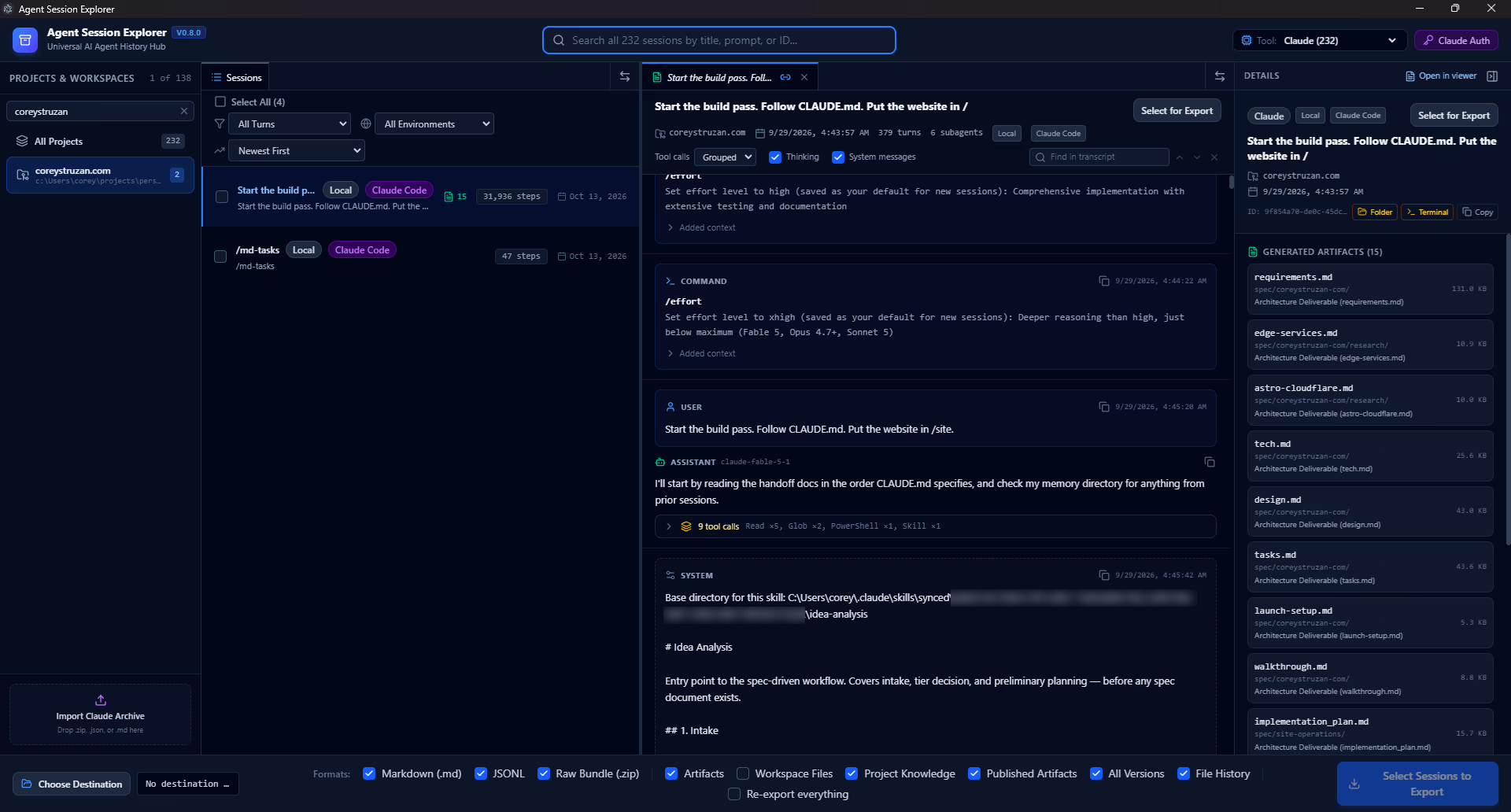
Your sessions are your paper trail.
The code shows what changed. The session shows why: the plan you approved, the cause your agent tracked down, the option you turned down. And it doesn't last. Claude Code deletes a session's local transcript after 30 days by default (its cleanupPeriodDays setting), and cloud sessions live on the tool's servers, in its own formats.
Agent Session Explorer reads your sessions where they are, and keeps a copy that outlives them.
Find it, read it, pick it up, keep it.
Find
Projects and workspaces down the side. Search by title, first prompt or session ID across every project, and filter by subagents and by where a session ran: local, cloud, Remote Control or imported.
Read
The whole conversation in order: formatted replies, thinking, every tool call with its parameters and results, images, and each subagent's own conversation. Ctrl+F searches within a session.
Continue
Continue Session takes a Claude session back to where it runs: Claude Code in a terminal, VS Code, Claude Desktop, or its page on claude.ai.
Link
Copy an ase:// link to a session, a message, a piece of a reply or a tool call, and paste it into your notes, an issue or a commit. Opening it takes you straight there. A link can only open a viewer, never run anything.
Archive
Export one, several or all sessions to clean Markdown, normalized JSONL and a byte-for-byte raw bundle. Re-exporting adds what's new and refreshes what changed. The archive keeps everything it has ever saved, so a session the tool has since deleted still opens, and links to it keep working.
Back up and move
Export your Claude sessions as zips and import them on another machine, or after a reinstall, to read and search them there. Antigravity sessions export too; importing is for Claude sessions.
Claude and Google Antigravity.
Claude
- Claude Code sessions on this machine
- Claude Code on the web, Cowork, Remote Control and Claude Chat, through your claude.ai sign-in
- Archives you've exported or imported
Google Antigravity
- Sessions read from Antigravity's own data, even while it's open and working
- Sessions that are on disk but missing from Antigravity's own index, recovered and listed
More agents are planned.
Your sessions stay on your machine.
- The app has no telemetry, no update check and no account of its own.
- It only reads the tools' files. It never changes them.
- It contacts claude.ai only when you sign in, and your session key is never written into an export.
From a commit to the conversation that made it.
When SpecDevShip commits work for a spec, the commit ends with a Session: line naming the Claude Code session that made it. Paste that ID into Agent Session Explorer's search to open the conversation, and copy a link to the exact message. The details pane lists the documents a session wrote, such as requirements.md, design.md and tasks.md, so you can see a spec take shape.
Coming soon, free for newsletter subscribers.
- When
- Coming soon.
- Price
- Free for everyone on the newsletter for a limited time when it launches. After that, a free bonus with the full SpecDevShip Skill Pack.
- Platforms
- Windows and macOS.
- Delivery
- Read-only access to its private GitHub repository.
- License
- Commercial and source-available.
Don't lose the next one.
Join the newsletter to get Agent Session Explorer free when it launches. You'll get the free field guide straight away.