TL;DR: Claude Code deletes a session's local transcript after 30 days by default, and those sessions are where the reasons behind my code live. So I built Agent Session Explorer, a desktop app that finds, reads, continues, links to and archives the sessions of my AI coding agents. It's joining the SpecDevShip family. It's coming soon for Windows and macOS, and it'll be free for everyone on the newsletter for a limited time when it launches.
My sessions are the paper trail
When I wrote up how I built my personal site in one day, the evidence wasn't the code. It was the conversations: the agent choosing the full spec tier and saying why, the four documents it wrote and waited on, and the moments a designer agent and a builder agent caught each other's mistakes.
The code shows what changed. The session shows why. That matters most months later, when you're asking why the deploy works the way it does, or which option you turned down and what was wrong with it. The answer is in a session, if you can still find it.
And they disappear
Claude Code keeps a session's transcript on your machine for 30 days after it was last used, then deletes it. That's its cleanupPeriodDays setting. Sessions that ran in the cloud live on Anthropic's servers instead, somewhere else and in another format. Rename or move a project's folder, and its sessions stop showing up where you'd look for them.
I didn't want the record of my work to depend on a cleanup setting.
Meet Agent Session Explorer
Agent Session Explorer is a desktop app that reads the sessions your AI coding tools keep, in their folders and on their servers. It lets you find, read, search, continue, link to and export them.
It reads Claude: Claude Code sessions on your machine, plus Claude Code on the web, Cowork, Remote Control and Claude Chat through your claude.ai sign-in. It also reads Google Antigravity.
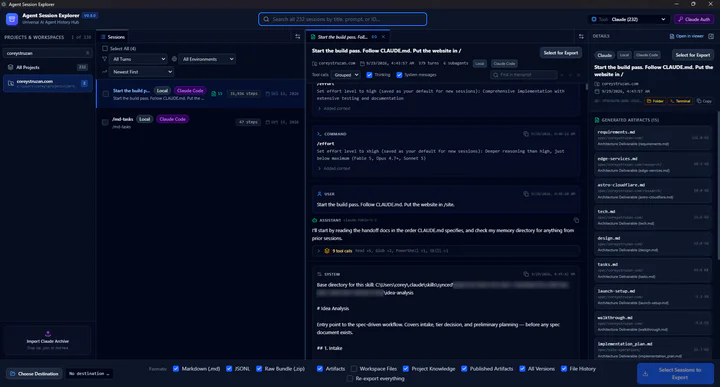 The coreystruzan.com build session from the case study, in Agent Session Explorer
That's the session behind the case study: 379 turns and 6 subagents, with the 15 documents it generated listed on the right.
Finding the one you want
Projects and workspaces run down the left. The search box at the top finds a session by its title, its first prompt or its ID, across every project at once. Filters narrow the list to subagents, or to where a session ran: on this machine, in the cloud, through Remote Control, or imported from an archive.
The ID search pairs well with SpecDevShip. When SpecDevShip commits work for a spec, the commit message ends with a Session: line naming the session that made it. Paste that ID into the search, and you're reading the conversation behind the commit.
Reading it properly
A session opens in full, in order. You get formatted replies, the agent's thinking (which you can hide), and every tool call with its parameters and its full result. Tool calls are grouped by default, so a run of file reads doesn't bury the conversation.
When the agent handed work to a subagent, that subagent's own conversation opens from the call that started it. Ctrl+F searches the session, tool results included.
Picking up where you left off
For a Claude session, Continue Session takes you back to where it runs: Claude Code in a terminal, VS Code, Claude Desktop, or the session's page on claude.ai. It won't hand over a session that's already open somewhere else.
Linking straight to the moment
Right-click a message, a piece of a reply or a tool call, and copy an ase:// link to it. Paste it into your notes, an issue or a commit message. Opening it later takes you straight to that point in the session.
The links are deliberately limited. A link can open a viewer, and that's all: it can't start an export, change a setting or run anything.
Keeping it, and taking it with you
Exports are where the app earns its keep. Choose a folder, and export one session, a selection or everything. You get clean Markdown to read, normalized JSONL for other tools, and a raw bundle with byte-for-byte copies of the tool's own files.
Export into the same folder again later, and it adds what's new and refreshes what changed, leaving the rest alone. The archive keeps everything it has ever saved. When Claude Code deletes a session, it still opens in the app from your archive, and links to it keep working.
The same exports move with you. Import your exported Claude sessions on another machine, or after a reinstall, and they're there to read and search. Antigravity sessions export too, but importing is for Claude sessions.
Private by design
The app has no telemetry, no update check and no account of its own. It only reads your tools' files, and never changes them. Reading local sessions, importing, viewing and exporting all happen on your machine. It talks to claude.ai only when you sign in to read your cloud sessions, and your session key never goes into an export.
Where it fits in SpecDevShip
SpecDevShip makes the plan, the approvals and the commits explicit. Agent Session Explorer keeps the conversations behind them.
The details pane lists the documents a session wrote, like requirements.md, design.md and tasks.md, so you can watch a spec take shape. And a commit's Session: line gets you from the code back to the conversation in one search.
When you can get it
Agent Session Explorer is coming soon, for Windows and macOS. When it launches, it'll be free for everyone on the SpecDevShip newsletter for a limited time, as read-only access to its private GitHub repository. After that, it's a free bonus with the full SpecDevShip Skill Pack. It comes under a commercial, source-available license.
Join the newsletter to get it free when it launches, and you'll get the free field guide straight away. If you'd like the details first, here's everything it does.